

Buffer Pricing 2026: What You'll Really Pay Per Channel
Buffer pricing is per channel: $6 a month on Essentials, $12 on Team, less yearly or past 10 channels. What 3, 6 and 15 channels really cost.
 DumbSMM Team
On this page 11 sections
- Buffer pricing plans at a glance
- How much does Buffer cost per channel?
- Where Buffer's own pages disagree
- What Buffer actually costs as you add channels
- Is Buffer free?
- Does Buffer have a free trial?
- Buffer Essentials vs Team: which one should you buy?
- Buffer discounts: yearly, nonprofit and education
- Buffer refunds and cancelling
- Buffer alternatives
- A free alternative (full disclosure: it's ours)
- Buffer pricing FAQ
- Is Buffer free?
- How much does Buffer cost per month?
- Does Buffer charge per channel or per user?
- Is Buffer cheaper if you pay yearly?
- Does Buffer have a free trial?
- Can I get a refund from Buffer?
- Does Buffer offer a nonprofit discount?
- Is Buffer Team worth it over Essentials?
Buffer pricing leads with $5, and that number is doing a lot of work. The pricing page opens on yearly billing with one channel selected, so $5 is the cheapest paid setup there is. Your real bill is a per-channel rate times every account you connect, and the rate changes after your 10th channel.
We read Buffer's pricing page, its machine-readable price list, the help center and the terms of use so you don't have to. Below: the plans, the per-channel math, what 3, 6 and 15 channels really cost, and the places where Buffer's own pages contradict each other.
Prices checked on October 7, 2026, in USD, before tax. Buffer changes its plans from time to time, so check buffer.com/pricing before you pay.
Buffer pricing plans at a glance#
| Free | Essentials | Team | |
|---|---|---|---|
| Price | $0 | $6 per channel/month, or $5 billed yearly ($60/year) | $12 per channel/month, or $10 billed yearly ($120/year) |
| Channels | Up to 3 | As many as you pay for | As many as you pay for |
| Scheduled posts | 10 per channel at a time | Unlimited (fair-use cap: 5,000 per channel) | Unlimited (same cap) |
| Users | 1 | 1 | Unlimited |
| Analytics | 30 days of history | Unlimited history, reports, custom analytics | Adds branded reports |
| AI comment replies | 5 suggestions a week | Unlimited | Unlimited |
| First comment, hashtag manager | No | Yes | Yes |
| Approvals and permissions | No | No | Yes |
| API | 1 key, 3,000 requests/month | 3 keys, 7,500/month | 5 keys, 15,000/month |
A channel is one connected account: one Instagram profile, one Facebook page, one TikTok. Buffer's own example is five brands with Instagram and Facebook each, which makes 10 channels. The Start Page, Buffer's link-in-bio page, counts as a channel too.
How much does Buffer cost per channel?#
The per-channel rate isn't flat, and plenty of Buffer pricing guides miss this. Every channel past your 10th costs less:
| Channels | Essentials, monthly billing | Essentials, yearly billing | Team, monthly billing | Team, yearly billing |
|---|---|---|---|---|
| 1 to 10 | $6 each per month | $60 each per year | $12 each per month | $120 each per year |
| 11 to 25 | $4 | $40 | $4 | $40 |
| 26 to 50 | $3 | $30 | $3 | $30 |
| 51 and up | $1 | $10 or $20 (see below) | $2 | $20 |
The bands work like tax brackets. Your 11th channel costs $4, but your first 10 still cost $6 each. So 15 channels on Essentials is 10 × $6 plus 5 × $4, which is $80 a month, not 15 × $4. If a guide multiplies $6 by 25 channels, it's ignoring the bands.
Now look at the Team column after channel 10. It drops from $12 to $4, the same as Essentials. Remember that, because it makes Team weirdly good value for agencies.
This is recent. Buffer's pricing page says prices were last updated in November 2025, and its 2025 recap says it "started rolling out new pricing that works better for people with a lot of channels."
Where Buffer's own pages disagree#
- The yearly discount. The pricing page says yearly billing lets you "save 2 months," and the calculator charges 10 months for 12, which is about 17% off. The FAQ on the same page promises "a 20% discount." The real prices ($60 a year vs $72 for an Essentials channel) match the 17%.
- Essentials past 50 channels, billed yearly. The help center says $20 per channel per year. The calculator charges $10. If you run more than 50 channels, ask support which one they'll bill.
What Buffer actually costs as you add channels#
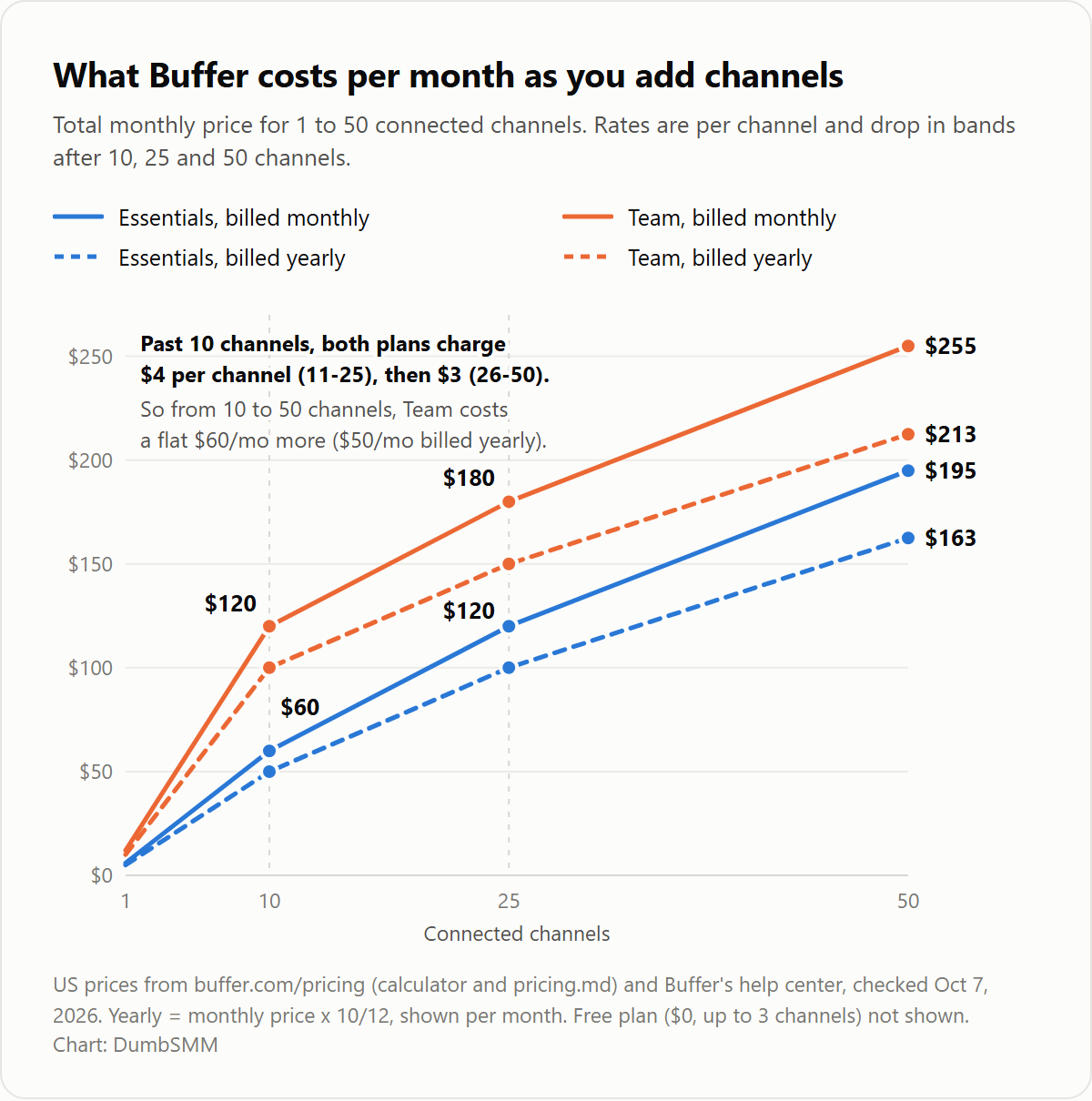
The bends at 10 and 25 channels are the volume bands kicking in. Here's what that means for three common setups:
| Setup | Channels | Essentials | Team |
|---|---|---|---|
| Solo creator (Instagram, TikTok, YouTube) | 3 | $18/month, or $15/month billed yearly ($180) | $36/month, or $30/month billed yearly ($360) |
| Small brand (adds Facebook, LinkedIn, X) | 6 | $36/month, or $30/month yearly ($360) | $72/month, or $60/month yearly ($720) |
| Agency (5 clients, 3 channels each) | 15 | $80/month, or $66.67/month yearly ($800) | $140/month, or $116.67/month yearly ($1,400) |
Solo creator: if 10 queued posts per channel is enough, the Free plan covers all three accounts for $0. Paying gets you unlimited queues, full analytics history and first-comment scheduling.
Small brand: Essentials, unless someone else needs to log in. Essentials has one user, and adding a second person means Team, which doubles the bill at this size.
Agency: this is where the bands pay off. Anywhere from 10 to 50 channels, Team costs exactly $60 a month more than Essentials ($50 on yearly billing), because past 10 both plans charge the same $4, then $3. At 15 channels, that's $9.33 per channel for unlimited seats and client approvals.
Is Buffer free?#
Yes. The Free plan is $0 forever, needs no card, and is enough for plenty of solo creators. You get:
- 3 channels connected at a time.
- 10 scheduled posts per channel at a time. That's a queue cap, not a monthly cap. When a post goes out, its slot opens up again.
- 1 user, 100 ideas and 3 tags.
- Analytics with 30 days of history, but no exportable reports.
- The AI Assistant for writing posts, plus 5 AI comment-reply suggestions a week.
- No first-comment scheduling, hashtag manager, custom video covers, approvals or branded reports.
Then there's the catch that isn't on the pricing page. The help center says Free has a lifetime limit of 8 unique channel connections, and disconnecting a channel doesn't give the slot back. One help article says 8 in total. Another says 8 per social network (so 8 different TikTok accounts). Either way, if you rotate client accounts through a Free plan, you'll hit it. Paid plans don't have this cap.
Also, the help center and the pricing page disagree on two Free features (channel groups and custom UTM parameters), so test them before you count on them. And if you upgrade, you pay for every channel, including your 3 free ones.
Does Buffer have a free trial?#
Yes, 14 days, with a few catches:
- The trial puts you on the Team plan, so you can invite teammates.
- You don't need a card. If you don't add one, you drop to Free when the trial ends, and any channels beyond 3 get locked.
- If a card is already saved on your account, Buffer upgrades you automatically when the trial ends and takes the first payment. Cancel the trial in Billing if you don't want that.
- You get one trial per account. If you're still on a legacy plan (Pro, Premium or Business), you can't trial the new plans at all.
Since the trial runs on Team, check which plan you're on before you add a card. Under 10 channels, Team costs twice as much as Essentials.
Buffer Essentials vs Team: which one should you buy?#
| Essentials | Team | |
|---|---|---|
| Channels 1 to 10 | $6/month each ($5 yearly) | $12/month each ($10 yearly) |
| Channels 11 to 50 | $4, then $3 | $4, then $3 |
| Channels 51 and up | $1 | $2 |
| Users | 1 | Unlimited |
| Approval workflows | No | Yes |
| Per-channel access levels | No | Yes |
| Branded reports | No | Yes |
| API | 3 keys, 7,500 requests/month | 5 keys, 15,000 requests/month |
| Publishing, analytics, inbox, AI | Same | Same |
Pick Essentials if you work alone. You get every publishing, inbox and analytics feature Team has, except branded reports.
Pick Team if anyone else needs to log in, a client has to approve posts, or you want reports with your logo on them. Under 10 channels it doubles your bill. Past 10, it's a flat $60 a month extra, which is cheap for unlimited seats.
Buffer discounts: yearly, nonprofit and education#
- Yearly billing: about 17% off, or two months free. The FAQ's "20%" doesn't match the prices.
- Nonprofits and charities: 50% off paid plans. Create a free account, then send the nonprofit request form with your documentation. Buffer says it replies within 48 hours.
- Open source projects with 1,000+ GitHub stars get the same 50%. Email hello@buffer.com with a link to the repo.
- Education: Buffer has a Higher Education page, but it doesn't publish an education or student discount.
Buffer refunds and cancelling#
On refunds, Buffer's help center is friendlier than its terms. The refund policy offers your money back within 7 days of starting a monthly plan, or within 30 days of starting an annual one, through a form. The Terms of Use say "Service fees are not refundable," and that fees are non-refundable unless the terms say otherwise.
Those two don't line up. If you're inside the window, use the form right away and keep the confirmation email.
Cancelling is simpler:
- Go to Billing, click the three dots, then Cancel Plan. Your plan stays active until the end of the billing period.
- You pick 3 channels to keep on Free. The rest get locked but stay connected, and they unlock if you upgrade again.
- Changed your mind before the period ends? Keep My Plan brings everything back, scheduled posts included.
- Subscribed in the iOS or Android app? Cancel and ask for refunds through Apple or Google.
- Plans renew automatically, so cancel before the renewal date or you pay for the next period.
- If a payment fails, Buffer retries it four times over three weeks, then moves you to Free.
One more contradiction, on payments. The pricing FAQ says Buffer can't take PayPal, checks or bank transfers. The help center lists Apple Pay, Amazon Pay, Cash App, Link and US bank accounts (for charges over $250). PayPal is a no on both.
Buffer alternatives#
Buffer is cheap at 3 channels, and the bands keep it sane at 30. The awkward spot is a small team: a second person means Team, and Team doubles the bill until you pass 10 channels.
If you shop around, price your real setup on each tool: channels, people, monthly or yearly. Tools charge per user, per bundle of accounts or per channel, so one that's cheaper at 3 channels can cost more at 15.
A free alternative (full disclosure: it's ours)#
We built DumbSMM, and its AI social media scheduler is free, so there's no per-channel math. It's made for short video. You connect Instagram, TikTok and YouTube, approve the videos you want posted, and AutoPost fills the next open slots at the daily pace and time zone you set. If an account's reach drops below its usual baseline, it can ease off posting on that platform. Nothing to post yet? The short video maker turns your website into UGC-style videos, product demos and memes, and you don't need an account to start.
To be fair, Buffer does a lot more. It publishes to a dozen networks (we do three). It also has a comment inbox, deeper analytics with exportable reports, team approvals and permissions, mobile apps, and integrations like Canva and Zapier. If you post text and images to LinkedIn, X, Threads or Pinterest, Buffer is the better tool, and its Free plan is a fair deal.
But if you mostly post short videos to Instagram, TikTok and YouTube and don't want a bill that grows with every account, try the DumbSMM scheduler. It's free.
Buffer pricing FAQ#
Is Buffer free?#
Yes. The Free plan costs $0, needs no card, and covers up to 3 channels, 10 scheduled posts per channel at a time, 1 user and 30 days of analytics. There's also a lifetime cap of 8 unique channel connections on Free.
How much does Buffer cost per month?#
Essentials is $6 per channel a month, or $5 billed yearly. Team is $12 per channel a month, or $10 billed yearly. Past 10 channels, both plans drop to $4 per channel, and to $3 past 25. Three channels on Essentials cost $18 a month.
Does Buffer charge per channel or per user?#
Per channel. One channel is one connected account, such as an Instagram profile or a Facebook page. You don't pay per user: Free and Essentials allow 1, and Team allows unlimited.
Is Buffer cheaper if you pay yearly?#
Yes, by about 17%. Yearly billing charges 10 months for 12, so an Essentials channel costs $60 a year instead of $72. Buffer's FAQ says 20%, but its prices say otherwise.
Does Buffer have a free trial?#
Yes, 14 days on the Team plan, and you don't need a card. If you already have a card saved, Buffer upgrades you automatically at the end of the trial and charges it. Each account gets one trial.
Can I get a refund from Buffer?#
Buffer's help center offers refunds within 7 days of starting a monthly plan and 30 days of starting an annual one. Its Terms of Use say fees aren't refundable, so ask fast and in writing. If you cancel, you keep access until the period ends.
Does Buffer offer a nonprofit discount?#
Yes. Nonprofits and charities get 50% off paid plans, and so do open source projects with 1,000+ GitHub stars. You apply with documentation, and Buffer says it replies within 48 hours.
Is Buffer Team worth it over Essentials?#
If more than one person uses the account, yes. Under 10 channels, Team costs twice as much. From 10 to 50 channels, it's a flat $60 a month more ($50 on yearly billing) for unlimited users, approvals and branded reports.
Sources:
- Buffer pricing
- Buffer machine-readable pricing
- Buffer help: Pricing and features
- Buffer help: Information about free trials
- Buffer help: Connecting your channels to Buffer
- Buffer help: What happens when you downgrade to the Free plan
- Buffer help: Refund policy
- Buffer help: How to cancel your subscription
- Buffer help: Accepted payment methods
- Buffer help: Nonprofit discount
- Buffer for nonprofits
- Buffer Terms of Use
- Buffer: Everything we launched in 2025
All checked October 7, 2026. DumbSMM is not affiliated with Buffer.