

OpusClip Pricing 2026: Plans, Credits and the Fine Print
OpusClip costs $0, $15 or $29 a month ($14.50 billed yearly). What each plan gets you, how credits burn per minute, and the fine print on rollover.
 DumbSMM Team
On this page 11 sections
- OpusClip plans and prices at a glance
- How OpusClip credits work (it's minutes, not clips)
- What OpusClip actually costs per hour of video
- Is OpusClip free?
- Starter vs Pro: which one should you buy?
- Do OpusClip credits roll over?
- OpusClip refunds and cancelling
- Agent Opus and the Max plan
- Which OpusClip plan should you pick?
- A free alternative (full disclosure: it's ours)
- OpusClip pricing FAQ
- Is OpusClip free?
- How much does OpusClip cost per month?
- Does OpusClip have a watermark?
- How do OpusClip credits work?
- Do OpusClip credits roll over?
- Can I get a refund from OpusClip?
- Is OpusClip Pro worth it over Starter?
OpusClip pricing (you'll also see it searched as "Opus Clip pricing," since the company lives at opus.pro) looks simple until you hit the word "credits." Then it turns into a math problem with a rollover policy attached.
We read the pricing page, the help center and the terms of service so you don't have to. Below: every plan side by side, what an hour of video actually costs you, where OpusClip's own docs contradict each other, and which plan makes sense for how much you film.
Prices checked on October 6, 2026, in USD. OpusClip changes plans often, so check opus.pro/pricing before you pay.
OpusClip plans and prices at a glance#
| Free | Starter | Pro | Business | |
|---|---|---|---|---|
| Price | $0 | $15/month | $29/month, or $14.50/month billed yearly ($174) | Custom |
| Billing | n/a | Monthly only | Monthly or yearly | Contract |
| Credits (1 credit = 1 min of video) | 60/month | 150/month | 300/month per pack | Custom |
| Watermark | Yes | No | No | No |
| Export | Up to 1080p, exportable for 3 days | Highest resolution, 30-day window | Highest resolution, no limit | Highest resolution, no limit |
| Aspect ratios | 9:16 | 9:16 | 9:16, 1:1, 16:9 | 9:16, 1:1, 16:9 |
| Editing | No | Yes | Yes | Yes |
| Posting to socials | No | YouTube, TikTok, Instagram | Adds the scheduler, X, LinkedIn, Facebook and more | Everything in Pro |
| Export to Premiere Pro / DaVinci | No | No | Yes | Yes |
| Seats | Just you | Just you | 2 per pack, max 4 | Unlimited |
| Storage | Expires after 3 days | Expires after 29 days | 100 GB | Unlimited |
Two things jump out. Starter is the only paid plan you can't buy yearly. And Pro billed yearly is cheaper per month than Starter. More on that below.
How OpusClip credits work (it's minutes, not clips)#
This is the part people get wrong. OpusClip doesn't charge per clip. It charges per minute of the video you feed it.
- 1 credit = 1 minute of source video. A 30-minute podcast costs 30 credits, whether you end up with 3 clips or 30.
- Short videos round up. Anything under a minute costs 1 credit.
- Partial minutes round down. A 4.5-minute video costs 4 credits.
- You can clip part of a video. Drag the "processing timeframe" slider before you submit and you only pay for that stretch.
- Posting to X costs extra. It's 3 credits per clip, per X account. One clip to two X accounts is 6 credits. Failed posts and deleted scheduled posts are refunded automatically.
So the plan sizes translate to:
- Free: about 1 hour of video a month
- Starter: about 2.5 hours
- Pro: about 5 hours per pack
What OpusClip actually costs per hour of video#
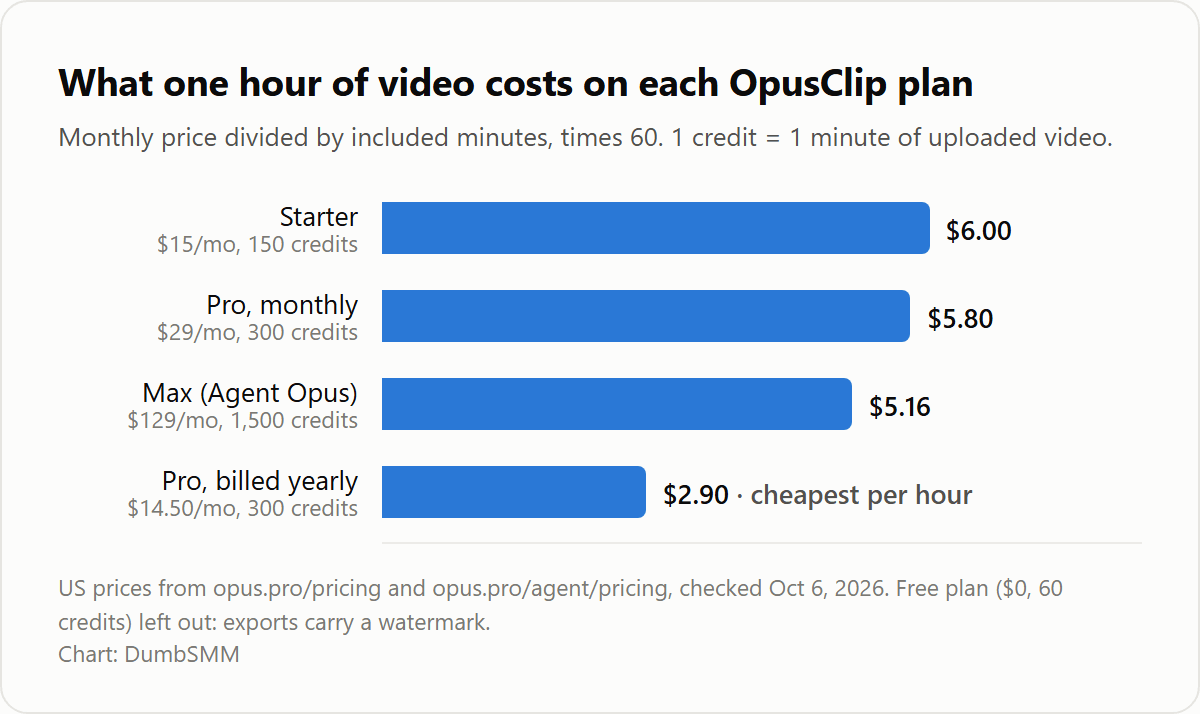
The sticker price is less useful than the price per hour of footage, because that's what you're really buying.
| Plan | Price per month | Video included | Cost per hour of video |
|---|---|---|---|
| Free | $0 | 1 hour | $0, but watermarked |
| Starter | $15 | 2.5 hours | $6.00 |
| Pro, monthly | $29 | 5 hours | $5.80 |
| Pro, billed yearly | $14.50 ($174/year) | 5 hours | $2.90 |
| Max, via Agent Opus | $129 | 25 hours | $5.16 |
Here's the weird one. Pro billed yearly works out to $14.50 a month. That's 50 cents less than Starter, and you get twice the credits plus every Pro feature. The catch is paying $174 up front, with no refund if you change your mind (see refunds).
If you're sure you'll use OpusClip for a year, Starter makes no sense. If you're not sure, Starter is the cheapest way to find out without a watermark.
Is OpusClip free?#
Kind of. The Free plan gives you 60 credits a month forever, with no card. That's real, but it comes with conditions:
- Every export carries an OpusClip watermark.
- There's no editing.
- Clips stop being exportable after 3 days, and stored media expires after 3 days.
- It's 9:16 only, up to 1080p.
There's also a free trial of the paid plans, which is a different thing from the Free plan. According to OpusClip's help center, you don't need a card for it if you're in one of the countries they serve "at full capacity." Videos exported during the trial still have the watermark.
Bottom line: the Free plan is fine for testing whether AI clipping works on your content. It isn't something you'd post from under your brand name.
Starter vs Pro: which one should you buy?#
| Starter ($15/mo) | Pro ($29/mo or $14.50/mo yearly) | |
|---|---|---|
| Credits | 150/month | 300/month per pack |
| Billing | Monthly only | Monthly or yearly |
| Social scheduler | No, post-now only | Yes |
| Aspect ratios | 9:16 only | 9:16, 1:1, 16:9 |
| Video sources | YouTube, uploads, Google Drive, Vimeo, Zoom, Rumble, StreamYard | Adds Twitch, Riverside, Dropbox, Loom, public MP4 links and more |
| Max upload | 10 GB | 30 GB |
| AI B-roll | 3 AI image + 3 stock clips per month | 50 AI image clips per day, unlimited stock, AI video B-roll |
| Custom fonts | No | Up to 2 |
| Premiere Pro / DaVinci export | No | Yes |
| Team seats | No | 2 per pack, up to 4 |
| API and Zapier | No | Limited API, Zapier up to 300 credits/month |
Pick Starter if you clip less than about 2.5 hours a month, only need vertical video for Shorts, TikTok and Reels, and want to stay month to month.
Pick Pro if you need scheduling, square or horizontal clips, editor handoff to Premiere or DaVinci, a teammate, or more than 2.5 hours a month. And if you can pay yearly, Pro is cheaper than Starter anyway.
Do OpusClip credits roll over?#
Here's where it gets murky, and it's worth knowing before you buy a year.
- Monthly plans: the help center says credits expire after 60 days. In practice, unused credits roll over for one extra month.
- Yearly Pro: the docs disagree. The pricing page says you get "300 credits per month" and that "unused credits roll over for 2 months." The help center says yearly plans get the whole year of credits up front, valid for 12 months. Those are very different deals if your filming is seasonal. Ask support which one applies to you, and get the answer in writing.
- If you cancel: the help center says your remaining credits keep their original expiry date, even if that's after your billing cycle ends.
Need more credits mid-month? You have three options:
- "Add More Credits": the button in the dashboard buys your current plan again.
- Add packs (Pro only): each pack adds 300 credits and 2 seats, up to 4 seats total.
- On-demand top-ups: Pro lists these as a new feature, but there's no public price for them.
OpusClip refunds and cancelling#
OpusClip's terms of service are blunt:
- You can't end a paid period early.
- You won't get a prorated refund for the rest of the period.
- Fees you've already paid aren't refunded, except where the agreement says otherwise.
When you cancel, you keep access until the end of what you paid for. That's normal for SaaS, but it matters most for the yearly plan: once the $174 is paid, it's spent.
Payments go through Stripe. OpusClip also says that if it or Stripe spots suspicious payment activity, it can suspend the account and forfeit any existing credits.
Practical tip: if you take the yearly deal, put the renewal date in your calendar the day you subscribe.
Agent Opus and the Max plan#
Agent Opus is OpusClip's separate text-to-video product, with its own pricing page:
- Pro: $29 a month, or $348 a year. That's no discount for paying yearly, unlike OpusClip Pro.
- Max: $129 a month, or $1,548 a year, with 1,500 credits a month per pack.
Max doesn't appear on OpusClip's own pricing page. The help center says Max is "available only through Agent Opus, but credits can be used on OpusClip." If you clip more than about 25 hours a month, compare Max with stacking several Pro packs or asking about Business.
Which OpusClip plan should you pick?#
| If you... | Video per month | Cheapest plan that fits | Cost |
|---|---|---|---|
| Just want to see if AI clipping works for you | Under 1 hour | Free | $0, watermarked |
| Clip one 30-minute show a week | About 2 hours (120 credits) | Starter | $15/month |
| Clip a weekly 60-minute podcast | 4 to 5 hours (240 to 300 credits) | Pro, 1 pack | $14.50/month billed yearly, or $29 monthly |
| Run an agency or clip every day | 25+ hours | Several Pro packs, Max, or Business | $129+/month, or talk to sales |
A free alternative (full disclosure: it's ours)#
We built DumbSMM, and it has a free AI clipper. Paste a YouTube link or upload a video and you get captioned vertical clips back. You don't need an account to start, and there's no watermark.
To be fair, OpusClip does more. ClipAnything's prompt-based clipping, XML export to Premiere and DaVinci, team workspaces, AI B-roll and dubbing are all real features we don't try to match. If you need them, Pro billed yearly is a fair price.
But if you just want clips from your podcast without doing credit math first, try DumbSMM Clips. It's free.
OpusClip pricing FAQ#
Is OpusClip free?#
Yes, with limits. The Free plan includes 60 credits a month, which is about one hour of video. Exports are watermarked, there's no editing, and clips can only be exported for 3 days.
How much does OpusClip cost per month?#
Starter is $15 a month and is only billed monthly. Pro is $29 a month, or $14.50 a month if you pay $174 for a year. Business pricing is custom.
Does OpusClip have a watermark?#
On the Free plan and during the free trial, yes. Starter, Pro and Business export without a watermark.
How do OpusClip credits work?#
One credit covers one minute of the video you upload, no matter how many clips come out of it. Videos under a minute round up to 1 credit, and partial minutes round down. Posting to X costs 3 credits per clip per X account.
Do OpusClip credits roll over?#
On monthly plans, credits last 60 days, so they carry over for one extra month. For yearly Pro, the pricing page and the help center say different things (monthly credits with 2-month rollover vs. a full year of credits up front), so confirm with support.
Can I get a refund from OpusClip?#
Generally no. OpusClip's terms say paid periods can't be cancelled early, there are no prorated refunds, and fees already paid aren't refunded except as the agreement provides. When you cancel, you keep access until the end of the period you paid for.
Is OpusClip Pro worth it over Starter?#
If you'd pay for Starter anyway and can commit to a year, yes. Pro billed yearly costs $14.50 a month against Starter's $15 and gives you twice the credits plus scheduling, more aspect ratios and Premiere/DaVinci export. If you only need a month or two of vertical clips, Starter is the safer bet.
Sources:
- OpusClip pricing
- OpusClip help: How do credits work?
- OpusClip help: Plans
- OpusClip help: Payments & billing
- OpusClip terms of service
- Agent Opus pricing
All checked October 6, 2026. DumbSMM is not affiliated with OpusClip.